• Home
  • Blog
  • Ask
  • About
    • Looking For Writer

SimpleiPhone

Menu

  • Apps
  • Feature
  • How To
    • Intermediate
    • Novice
  • Misc
  • News
  • Quick Tip
Previous Next

How To: Watch Live Sports on Your iPhone

June 17, 2012 · by Tom

This feature is a glimpse of what the future will be like. No more big cable subscriptions just to get the few channels you actually watch. You can watch practically anything you want, when you want, on the internet. Sports are no exception.

ESPN has an iPhone app that allows customers of qualified cable providers to watch their ESPN network of channels all right from their iPhones! But yes, there’s a catch. If you read carefully, you would have noticed I said “customers of qualified cable subscribers.” We figure there is some contractual agreement between ESPN and the cable providers that inhibit ESPN from offering this for free. Here’s to hoping someday it all changes for the better!

If you are wondering whether you are eligible or not, check out ESPN’s list of participating providers here. If your cable provider is on that list, then you’re in! If not, well… then call and nicely ask your cable provider ‘Why?’ and we’ll wait for you here.

Without further adue, here’s how to watch live sports. First you need to download the Watch ESPN app from the App Store. So click here.

After it’s done downloading, go ahead and open it. You’ll see this welcome screen.

20120617-195839.jpg

Now it will prompt you to select and sign into your respected cable provider. You will need to have the log in information for your online account associated with your cable provider. If you do not, visit your cable providers website and create an account. If your cable provider was on the list we mentioned above, then you’ll see this screen after completing the signup:
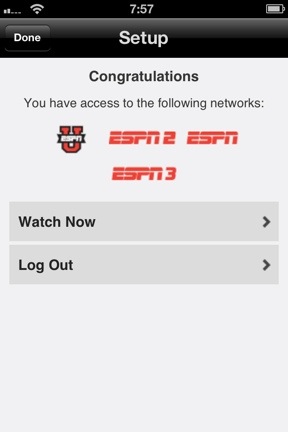
20120617-195850.jpg

Clicking Watch Now will take you here:
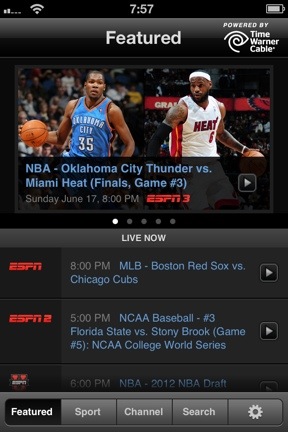
20120617-195858.jpg

Now you are ready to watch live sports anywhere you go! If the big game is on and you are away from a television, no need to worry! You can just whip out your iPhone and start to watch it right from where you are!

And uh… go ahead and let the people around you see how tech savvy you are. 🙂

Rate this:

Share this:

  • Tweet
  • Click to email a link to a friend (Opens in new window) Email
Like Loading...
Posted In: Feature, How To, Novice
Tagged: Apple, apps, Cable Providers, easy, ESPN, friends, Games, iOS, iPhone, iphone 4, Live, simple, Sports, technology, tutorial, TV, useful, Watch

Comments

Leave A Comment →

Leave a comment Cancel reply

  • Like us on Facebook!

    Like us on Facebook!
  • Enter your email address to follow this blog and receive notifications of new posts by email.

    Join 93 other subscribers
  • Writers

    • Tom's avatar Tom
      • How To: Speed Dial using Workflow on Your iPhone
      • How To: Quickly Free Up Space on Your iPhone
      • How To: Use Widgets In iOS 8
    • Sam's avatar Sam
      • How To: Turn on Auto-Update for Apps
      • Quick Tip: Turning Rotation Lock (Orientation Lock) On and Off
      • How To: Change the Wallpaper on Your iPhone’s Home Screen and/or Lock Screen
  • alert alerts App Apple apps App Store autocorrect battery life bookmarks Call Camera cloud comment Contacts create customize delete download easy emoji emoticons folders free friends gadgets homescreen how to icloud iOS iOS 6 iOS 11 iPhone iphone 4 iPhone 4S iPhone 5 keyboard location lock Lock Screen lost maps messages music organization Phone photo photos photostream picture remove rename save screen screenshot search setting Settings share shortcuts simple snapshot Speed Dial spotlight Starbucks stream technology text Texting timesaver tutorial typing Update upload useful webapp
  • Recent Posts

    • How To: Turn on Auto-Update for Apps
    • Quick Tip: Turning Rotation Lock (Orientation Lock) On and Off
    • How To: Speed Dial using Workflow on Your iPhone
    • How To: Change the Wallpaper on Your iPhone’s Home Screen and/or Lock Screen
    • How To: Quickly Free Up Space on Your iPhone
  • Like us on Facebook!

    Like us on Facebook!
  • Create a free website or blog at WordPress.com.
  • Connect with us:
  • Twitter
  • Facebook
  • YouTube
  • RSS
Privacy & Cookies: This site uses cookies. By continuing to use this website, you agree to their use.
To find out more, including how to control cookies, see here: Cookie Policy
  • Comment
  • Reblog
  • Subscribe Subscribed
    • SimpleiPhone
    • Already have a WordPress.com account? Log in now.
    • SimpleiPhone
    • Subscribe Subscribed
    • Sign up
    • Log in
    • Copy shortlink
    • Report this content
    • View post in Reader
    • Manage subscriptions
    • Collapse this bar
 

Loading Comments...
 

    %d