
• Home
  • Blog
  • Ask
  • About
    • Looking For Writer

SimpleiPhone

Menu

  • Apps
  • Feature
  • How To
    • Intermediate
    • Novice
  • Misc
  • News
  • Quick Tip
Previous Next

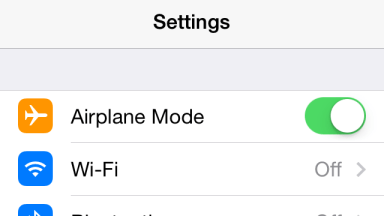
4 Uses of Airplane Mode That Don’t Involve Airplanes

August 26, 2014 · by Tom

IMG_1756.PNG

Unless you’re flying a lot for whatever reasons, you may not be using Airplane mode on your iPhone that often. But did you know there are other reasons for its usefulness? This is especially important lately due to the FAA relaxing restrictions on the use of electronic devices while in flight. So let’s find out.

1. Save Battery Life

You just left your house and it hit you; your iPhone is low on battery and you didn’t bring a charger. Yikes! What you could do is switch it over to Airplane mode to conserve your battery up until the exact moment you need it. Then switch it back off to restore your iPhone to it’s iPhone glory.

You can even continue to use most of your iPhone’s features such as the camera. If you’re going on a trip and plan on taking lots of pictures, go ahead and utilize Airplane mode to ensure your iPhone lasts through a full day of photography.

IMG_8220.PNG

Also, if you know you’ll be out of range of a good cellular signal for a good amount of time, it’s good to go ahead and put your iPhone in Airplane mode. When your device has spotty to no coverage, it works harder to find a good signal. Put your iPhone at ease and tell it to rest (in Airplane mode).

2. Charge Faster

Only got a few minutes next to an outlet to charge up? Going into Airplane mode while charging will allow your iPhone to charge much faster. If you can resist using your device for 10-20 minutes, you’ll get a much faster charge as opposed to using it while it’s charging.
IMG_8222.PNG

3. Reset Internet Connections

Sometimes your iPhone just needs to shake it out and start over. If you’re experiencing some choppy internet, either on WiFi or cellular, going into Airplane mode for about 10 seconds can fix the problem. This break helps your iPhone re-establish it’s internet connect in the case that something was awry.

4. Unplug And Be Social

Last but not least, Airplane mode is perfect for social gatherings. Putting the device into Airplane mode ensures that you won’t be getting any interruptions from Facebook or Snapchat. It makes it easier to be “in the moment” and mentally with those around you rather than being plugged in and staring at bright screens. You should even encourage others to do the same for a fun socially engaged time together.

That’s it! Did I miss anything? Sound off in the comments section below if you use Airplane mode in a way that wasn’t talked about in this article (other than for actual airplanes).

Rate this:

Share this:

  • Tweet
  • Click to email a link to a friend (Opens in new window) Email
Like Loading...
Posted In: Quick Tip

Comments

Leave A Comment →

Leave a comment Cancel reply

  • Like us on Facebook!

    Like us on Facebook!
  • Enter your email address to follow this blog and receive notifications of new posts by email.

    Join 93 other subscribers
  • Writers

    • Tom's avatar Tom
      • How To: Speed Dial using Workflow on Your iPhone
      • How To: Quickly Free Up Space on Your iPhone
      • How To: Use Widgets In iOS 8
    • Sam's avatar Sam
      • How To: Turn on Auto-Update for Apps
      • Quick Tip: Turning Rotation Lock (Orientation Lock) On and Off
      • How To: Change the Wallpaper on Your iPhone’s Home Screen and/or Lock Screen
  • alert alerts App Apple apps App Store autocorrect battery life bookmarks Call Camera cloud comment Contacts create customize delete download easy emoji emoticons folders free friends gadgets homescreen how to icloud iOS iOS 6 iOS 11 iPhone iphone 4 iPhone 4S iPhone 5 keyboard location lock Lock Screen lost maps messages music organization Phone photo photos photostream picture remove rename save screen screenshot search setting Settings share shortcuts simple snapshot Speed Dial spotlight Starbucks stream technology text Texting timesaver tutorial typing Update upload useful webapp
  • Recent Posts

    • How To: Turn on Auto-Update for Apps
    • Quick Tip: Turning Rotation Lock (Orientation Lock) On and Off
    • How To: Speed Dial using Workflow on Your iPhone
    • How To: Change the Wallpaper on Your iPhone’s Home Screen and/or Lock Screen
    • How To: Quickly Free Up Space on Your iPhone
  • Like us on Facebook!

    Like us on Facebook!
  • Blog at WordPress.com.
  • Connect with us:
  • Twitter
  • Facebook
  • YouTube
  • RSS
Privacy & Cookies: This site uses cookies. By continuing to use this website, you agree to their use.
To find out more, including how to control cookies, see here: Cookie Policy
  • Comment
  • Reblog
  • Subscribe Subscribed
    • SimpleiPhone
    • Already have a WordPress.com account? Log in now.
    • SimpleiPhone
    • Subscribe Subscribed
    • Sign up
    • Log in
    • Copy shortlink
    • Report this content
    • View post in Reader
    • Manage subscriptions
    • Collapse this bar
%d