
Ever get mad at your iPhone for dying so fast? Well don’t get too mad because it might not be your iPhone’s fault! It’s trying its best! One thing to check is to see if your iPhone’s GPS is working too hard for no reason. Let’s find out.
Browsing Category How To

How To: Use LED Flash As Text Alert
With the addition of the LED flash in Apple’s iPhone 4 and 4S, you can now allow the flash to act as a notification alert. For instance, if your iPhone is sitting on the table facedown and the ringer is on silent, you will see a quick flash of the LED light to grab your attention. Pretty cool, huh? For those of you that used to have Blackberry’s way back in the day, you might recall one of the better features was the versatility of the LED flash indicator. Now, the iPhone has it too. Read on to learn how to set this up within seconds!
Share this:

How To: Update Your iPhone

It’s always good to keep your iPhone up-to-date. Keeping your iPhone updated ensures that your iPhone has the latest bug fixes, performance fixes, and has Apple’s latest and greatest features. In fact, Apple just released an iPhone update a few days ago on Wednesday, March 7, 2012.
Updating is super easy, and in this tutorial, I will show you how to do it.
Read More →
Share this:

How To: Make Your iPhone Read Out Loud To You
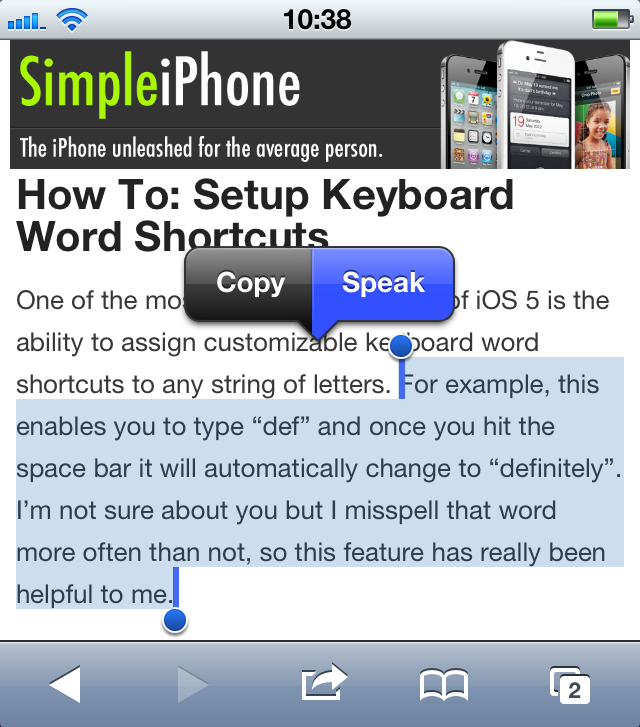
Have you ever been driving or doing some other activity when you received a long email. You probably wanted to know right away what the email said, but you didn’t want to (or couldn’t) take the time to read it. Speak Selection to the rescue!
With Speak Selection enabled, you can have your iPhone read to you any text that you highlight. This can come in handy when, for instance, you are driving and receive a long email that you want to read.
This tutorial will teach you how to enable and disable Speak Selection, as well as how to adjust the Speak Selection speaking rate.
Share this:

How To: Create Customized Ringtones For iPhone For Free

The first thing many people do when they get a new phone is customize the ringtone. Having that perfect ringtone to represent them when others hear their phone ring is a great feeling. But how do you do this on the iPhone? Many people have asked this question and we are hear to provide the answer.
We will give you a simple 5-step process on how to finally make that perfect ringtone for your new iPhone. Read on!
Share this:


How To: Get Quick Access to Music Controls and the “Camera” App From the Lock Screen

Have you ever been listening to music on your iPhone while jogging and a song that you didn’t like came on? You want to skip to the next track, but you don’t want to have to fiddle with your iPhone—having to unlock it, then having to navigate to the “Music” app, and then having to tap the “next track” button. If only there was a way to quickly skip to the next track!
Alternatively, have you ever seen something amazing happen and you wanted to take a quick snapshot of it, but the moment was gone by the time you got your iPhone out, unlocked it, opened the “Camera” app, and snapped the picture. If you could have just taken the picture a second earlier, you would have been able to capture an amazing picture. If only you could quickly access your iPhone’s “Camera” app without having to go through all of those steps.
You’re in luck! Both of these situations have a quick and easy remedy.
This brief tutorial will teach you how to quickly access (1) music controls and (2) your iPhone’s “Camera” app, all without having to unlock your iPhone and navigate to the respective app.
Share this:

How To: Use Spotlight Search
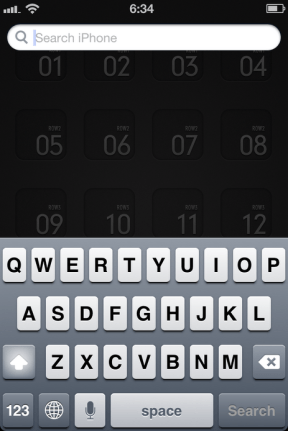
Spotlight Search is basically a “Google” for your iPhone. When you type in a search, Spotlight Search will scour your entire phone for whatever it is that you searched for. You can search for things like contacts, apps, music (including songs, albums, and artists), notes, events, podcasts, and more. This can be a real timesaver if you have a lot of music and want to quickly play a song or if you have downloaded a lot of apps and can’t seem to remember where the app is on your homescreen. All you have to do is start typing the name of the song or the app and Spotlight Search will bring it right to you!
This tutorial will teach you: (1) how to use Spotlight Search, and (2) how to customize your search results by excluding specific categories of items from the search results (like excluding music or contacts from your search results).
Share this:

How To: Create and Manage Photo Albums All on Your iPhone

I don’t know about you but I take a LOT of pictures with my iPhone. They say the best camera is the one you have with you, and that is definitely the case for me. One thing I loved about the iPhone is the ability to take high quality photos coupled with the ease of editing right on the device with the plethora of photography apps found on the App Store.
Before, all your photos were basically tossed together into one huge photo album on your device unless you went through the pains of organizing them on your computer first. But if you’re like me, you never did. But this has changed!
Now you can create and manage photo albums all on your iPhone. I’ll show you how!
Share this:

How To: Enable and Disable Auto-Correction

Have you ever tried to type an email or text message to someone, and even though you know you spelled a word correctly, your iPhone automatically “corrects” the word to something that you had no intention of writing? That’s your iPhone’s auto-correction feature hard at work.
In this tutorial you will learn: (1) how to selectively enable and disable your iPhone’s auto-correction feature, and (2) the effect disabling auto-correction has on misspelled words.

 SimpleiPhone